
Product Monitor by Anchor Software: See Every Job, Every User, Every System All in Real Time

Empowering our Customers to Make Informed Decisions, Optimize their Data Processing Workflows, and Enhance Overall Operational Efficiency.

Home » Products » Product Monitor
Lightbox

The Challenge of Seeing What’s Really Happening

Running a large mailing or data operation is a big job. Teams process thousands—sometimes millions—of records every day using powerful tools from Anchor Software. But what happens when something goes wrong? It’s not always easy to determine which jobs are running, who started them, how long they’re taking, or if they’re running into errors. Without clear oversight, systems get clogged, errors go unnoticed, jobs get repeated, or deadlines are missed. That costs money and weakens customer trust.
Product Monitor is Anchor Software’s answer to this challenge. It brings real-time operational visibility and comprehensive performance tracking to every Anchor-powered workflow. With Product Monitor, you finally see what’s running now, what has already finished, who started each job, and whether problems need fast attention. It’s not just about fixing issues; it’s about building a smarter, more transparent, and more efficient operation at every level.
Reports
ProductMonitorPhoneBlue

Why Monitoring and Job Tracking Matter

In any busy mailroom, print center, or IT department, so many jobs run at once that manual tracking simply can’t keep up. If you don’t have an accurate way to see what’s happening:
  • Errors slip by: Failed jobs can stack up before anyone notices.
  • System slowdowns become bottlenecks: One delayed process can hold up an entire day’s output.
  • Nobody knows the real cause of delays: It’s hard to improve when you don’t know where the problems are.
  • Wasted resources: Teams may repeat the same job or struggle with miscommunication.
  • Inaccurate billing or reporting: Without user and job logs, it’s challenging to allocate costs or chargeback usage.
With a powerful job monitoring tool like Product Monitor, you see every job, spot issues fast, analyze usage, and build a stronger, more accountable workflow. Tracking who ran what, when, and where helps with audits, billing, sharing best practices, and keeping operations moving efficiently.

What Is Product Monitor?

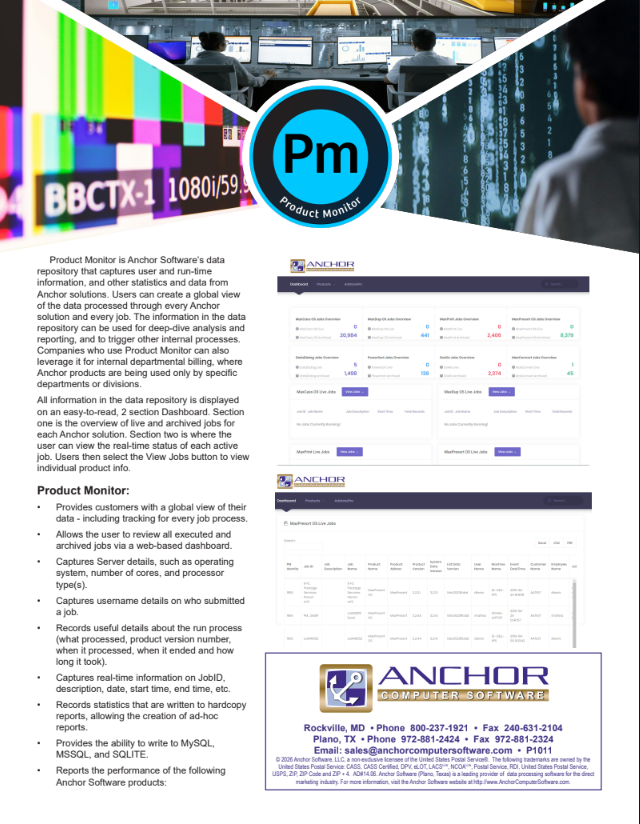
Product Monitor is a web-based operational dashboard for mail jobs that tracks, logs, and displays real-time and historical job data for all Anchor Software solutions. It serves as a central hub for job monitoring, workflow visibility, and user accountability.
Here’s what Product Monitor does:
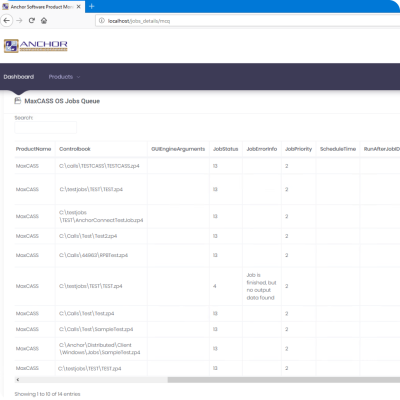
  • Captures every job run, start/end times, status, user name, product version, server specs, and more.
  • Logs execution outcomes and step-by-step results, including errors or failed jobs.
  • Shows who ran each job, when, on which server, and for how long.
  • Let’s you filter, report, and export data for billing, audits, or system review.
With Product Monitor, there’s no mystery. Your operations are visible, jobs are accountable, and decision-makers have the insights they need.

Key Features & Benefits

ProductMonitorCASSJob

Global Job Overview

Regardless of the number of Anchor tools or systems you use, Product Monitor offers a single dashboard that displays all job activity—whether live or completed. Get a “big picture” view of operations across the entire business at a glance.

Real-Time Job Status & Error Tracking

Track jobs as they process, see if they’re running, complete, or having trouble. Find out instantly if a job is stuck! Drill into details to view error logs, timings, or user actions, so you can address issues promptly.

Performance Metrics & Detailed Reporting

Track jobs as they process, see if they’re running, complete, or having trouble. Find out instantly if a job is stuck! Drill into details to view error logs, timings, or user actions, so you can address issues promptly.

Internal Department Billing & Allocation

With job and user tracking, it’s easy to see which teams or departments are running which jobs. You can allocate real costs, encourage smart resource use, or manage budget chargebacks all automatically.

Custom Dashboards & Flexible Data Exports

Tailor the dashboard to your needs and export your job data to MySQL, MSSQL, or SQLite. Dig deeper with custom analytics, integrations, or archival for audits.
How Product Monitor Works (A Simple Workflow Anyone Can Use)

  1. Install or Connect Product Monitor: Add Product Monitor to your Anchor Software environment with easy setup—on-premises or in the cloud.
  2. Automatic Data Collection: The system starts recording job details, user activities, performance data, and error logs for every Anchor Software job.
  3. Watch Live Jobs or Review History: View all jobs as they’re running, filter by status or user, and drill into any that are slow, stuck, or critical.
  4. Review Logs and Produce Reports: Click into job run histories, error details, or filter by department for clear, audit-ready records. Generate billing or activity reports instantly.
  5. Optimize and Improve: With complete transparency, you can identify issues before they escalate, coach teams, plan upgrades, and more accurately predict job performance for future projects.

Use Cases & Practical Examples

Mail Center Operations

A supervisor spots that yesterday’s largest print job was slow. Looking at Product Monitor, they see that it shares a server with another resource-intensive process. They reschedule jobs and prevent future conflicts—no more missed mail deadlines.

IT and Operations Teams

The data team can identify a critical import job that failed due to a specific error. With one click, they review prior runs, identify the fix, and re-launch confidently, no time wasted guessing or waiting for trouble tickets.

Internal Billing and Resource Allocation

A large company uses Product Monitor to see exactly which departments are running big reporting jobs. Costs are billed by actual resource use, helping each team become more accountable and efficient.

Compliance and Audit Review

When a regulator requests proof that monthly mailings were sent on time, the compliance team simply exports the Product Monitor logs. Auditors can see who ran each batch, when it finished, and what the outcome was; no stressful reconciliations are necessary.

Process Improvement Leads

Process improvement managers dig into job durations, error rates, and trends. They identify specific bottlenecks, help streamline workflows, and foster a culture of continuous improvement, all using data from Product Monitor.

Anchor Software’s Experience, Expertise, Authority, and Trust

  1. Anchor Software brings decades of leadership to the direct mail, data, and operational automation industry. Organizations nationwide depend on our mailing solutions for reliability, transparency, and cost savings. Product Monitor builds on this foundation:
    • Deep industry knowledge: Our tools are shaped by real-world mailroom, print, and data processing needs.
    • USPS and industry certifications: Our experience with postal rules and process compliance is second to none.
    • Trusted by leaders: Financial institutions, print shops, nonprofits, and enterprises rely on Anchor to power mission-critical workflows and audits.
    • A partner for growth: Our support team helps you deploy, configure, and optimize, so you see value from day one.
    With Product Monitor, you’re backed by the same team that’s enabled smarter, safer, and more efficient mailings for over 25 years.
prison

Frequently Asked Questions

What Anchor Software products work with Product Monitor?

All of them—Product Monitor tracks jobs in MaxPresort OS, MaxCASS OS, address correction tools, and more.

Yes. It logs the user who ran the job, start/end times, results, errors, server specifications, and more.

No. It’s designed for easy connection with Anchor systems. The interface utilizes simple dashboards and drill-down capabilities.

Absolutely. Product Monitor exports to MySQL, MSSQL, or SQLite—perfect for analysis or record-keeping.

Yes! Bill departments by the hours they use, or provide audit reports showing job runs, durations, and execution logs.

Not at all! Anchor Software’s support team can assist with initial setup and ongoing use.

Yes. Dashboards are customizable, and you can set up notifications for job errors or performance thresholds.

Product Monitor by Anchor Software

gives you something every busy operation needs: real-time, accurate insight into all your jobs, users, and systems. Spot issues as they happen, improve performance, and make smarter, faster decisions. With this powerful workflow visibility software, your team spends less time tracking down problems and more time getting great results.
Ready to boost control, accuracy, and efficiency in your mailing or data operations? Request a demo, schedule a free consultation, or contact Anchor Software today to see how Product Monitor can transform your job tracking and operational confidence.

Request a Demo

Product Monitor Product Sheet

Privacy Overview

This website uses cookies so that we can provide you with the best user experience possible. Cookie information is stored in your browser and performs functions such as recognising you when you return to our website and helping our team to understand which sections of the website you find most interesting and useful.